Somewhere in your college there is a student who paid a large fee for a coding course and learned less than a classmate who spent nothing. It happens more often than anyone admits. The internet now holds free courses from top universities, free practice platforms, free tools, free hosting and even free certificates. The problem is not access. The problem is knowing which free resources are genuinely good, what "free" really means, and how to turn them into a skill that an employer can see.
This guide answers all three. It covers more than 30 resources, grouped by what you need to do: learn, practise, build, prove and apply. For each one you get what it is, who it suits, how to use it properly and the catch to watch out for. It also gives you an honest answer to the question hidden in the title: can you really get certified without paying a rupee? The short answer is yes, in some cases, and no in others. The details matter, so they are explained clearly.
How to use it: do not try everything. Read the "What Is Actually Free?" section, pick one resource from each stage, and follow the 90-day plan at the end. A few resources used consistently beat fifty bookmarked and forgotten.
Last checked: the facts about fees, eligibility and certificates in this guide were checked in October 2026. Offers and prices change, so always confirm the latest terms on each official website before you register.
The Free Learning Stack
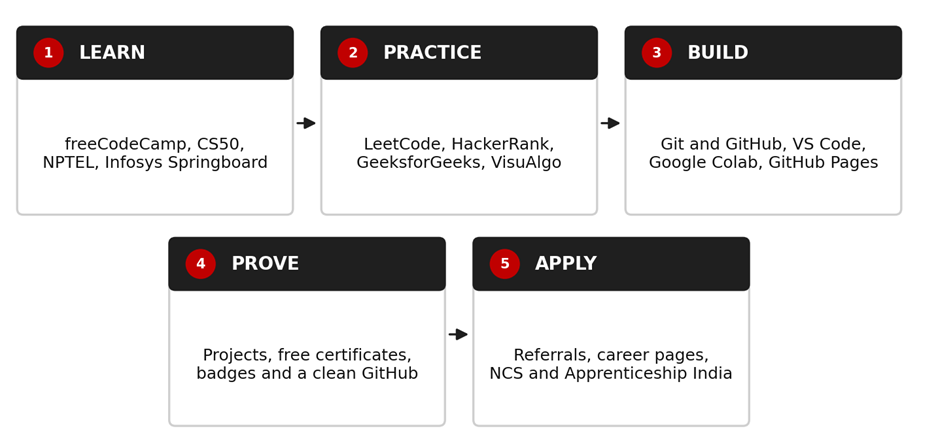
What This Guide Covers
• What "free" really means, and which resources give free certificates and which charge for them
• Free resources to learn coding, computer science, data, AI and cloud
• Free platforms for practice, interview preparation, tools and hosting
• The GitHub Student Developer Pack and government platforms for students
• How to build projects and open source experience for free
• Common traps, a 90-day free plan and how to show your learning to recruiters
Read This First: What "Free" Really Means
The word "free" is used in at least four different ways online. Knowing the difference saves you money and disappointment.
1. Completely free. Learning and certificate both cost nothing. freeCodeCamp is the best-known example.
2. Free to learn, paid to certify. The course is free, but the official certificate or exam costs money. NPTEL and most cloud certifications work this way.
3. Free with conditions. Free only if you qualify, such as being a verified student or living in a certain country.
4. Free trial or freemium. Free for a short time or with limits, then a paid plan. Always check before you commit.
Here is how some of the most useful resources compare:
|
Resource |
Learning |
Certificate or exam |
|
freeCodeCamp |
Free |
Free certifications (project-based and, in the newer curriculum, exam-based) |
|
CS50 (Harvard) |
Free |
Free CS50 certificate from CS50 itself; an optional paid verified certificate through edX |
|
NPTEL |
Free |
Certification exam is optional and paid (listed at Rs 1000 per exam on the official site; check the current fee) |
|
Infosys Springboard |
Free |
Certificates on completion of listed courses; some need a proctored assessment |
|
Kaggle Learn |
Free |
Free course certificates for its micro-courses |
|
Microsoft Learn |
Free |
Learning paths are free; official certification exams carry a fee |
|
AWS Skill Builder |
Free tier of digital training |
Official certification exams carry a fee |
|
SAP Learning Hub (student edition, India) |
Free for eligible students (announced November 2025) |
Announced with two free exam attempts; confirm current terms |
The honest truth about free certificates
A certificate proves that you finished something. A project proves that you can build something. Recruiters take certificates as supporting evidence, not as the main proof. Use free certificates to structure your learning, then back every one of them with a project you can show.
Part 1: Learn to Code for Free
freeCodeCamp
Link: https://www.freecodecamp.org
What it is: A non-profit that teaches web development, Python, data and more through interactive lessons and projects. Its 2026 curriculum introduced a new Certified Full Stack Developer path with real exams, alongside the older project-based certifications.
Best for: Absolute beginners who want one structured path from HTML to full stack, with certificates at no cost.
How to use it: Pick one certification path and finish it in order. Build every project yourself before looking at solutions. Use the large free video library on its YouTube channel to go deeper on topics you find hard.
Watch out: Its curriculum is changing, so check the current list of certifications on the site before you start. Finishing lessons without building your own projects will not make you job-ready.
CS50 (Harvard)
Link: https://cs50.harvard.edu/x
What it is: Harvard's famous introduction to computer science, free online. It covers C, Python, SQL, data structures and web programming, with problem sets that really test you.
Best for: Students who want strong fundamentals instead of one language, and who can handle a challenge.
How to use it: Watch each lecture, then do the problem set without hints. Register as the course asks, and request the free CS50 certificate after you meet the requirements.
Watch out: The free CS50 certificate does not verify your identity and is not an accredited Harvard qualification, as the course itself states. A paid verified certificate through edX is optional. The course is demanding, so plan for steady weekly time.
The Odin Project
Link: https://www.theodinproject.com
What it is: A free, project-based web development curriculum that teaches you to build real applications and use professional tools such as Git and the command line.
Best for: Learners who want a full stack web path with a strong emphasis on building things.
How to use it: Follow the curriculum in order, join its community for help and commit all your projects to GitHub as you go.
Watch out: It expects you to read, search and solve problems yourself. That is hard at first, but it builds exactly the skill employers want. It does not issue certificates, so your projects are your proof.
MDN Web Docs
Link: https://developer.mozilla.org
What it is: The standard free reference and learning area for HTML, CSS and JavaScript.
Best for: Anyone doing web development, as a trusted reference when tutorials disagree.
How to use it: Use it as your first stop whenever you meet an unfamiliar HTML, CSS or JavaScript feature. Its "Learn web development" area is a structured beginner path.
Watch out: It is a reference, not a hand-holding course, and it offers no certificates.
Official language tutorials: Dev.java and the Python Tutorial
Link: https://dev.java/learn/
What it is: Dev.java is the official Java learning site, and docs.python.org/3/tutorial is the official Python tutorial.
Best for: Learners who want accurate, up-to-date explanations straight from the source.
How to use it: Use them alongside a video course. When a tutorial confuses you, check the official explanation. Python tutorial: https://docs.python.org/3/tutorial/
Watch out: They are written clearly but they are not interactive, so practise each concept by writing code yourself.
Exercism
Link: https://exercism.org
What it is: A free, non-profit platform with coding exercises in many languages.
Best for: Learners who know the basics of a language and want focused practice on idiomatic code.
How to use it: Choose a language track, solve exercises on your own machine, and compare your solution with others after you submit.
Watch out: It is practice, not a full course, so pair it with a main learning path.
Part 2: Computer Science and University-Level Learning
NPTEL and SWAYAM
Link: https://nptekl.ac.in
What it is: NPTEL is a joint initiative of the IITs and IISc offering courses taught by IIT faculty. It is part of the government's SWAYAM platform (https://swayam.gov.in). All courses are free to enrol in and learn from.
Best for: Students who want rigorous computer science subjects such as data structures, operating systems, databases and machine learning, taught by respected faculty.
How to use it: Pick a subject that matches your current semester or your goal. Watch the lectures, submit the weekly assignments and use the course forum to ask doubts. Certification courses run in sessions, so check the current schedule.
Watch out: The certification exam is optional and is not free. The official site lists it at Rs 1000 per course exam, and it is an in-person proctored exam. Fees can differ (some universities list a different amount for certain courses), so check the current fee on the official website. You can learn everything for free without taking the exam.
MIT OpenCourseWare
Link: https://ocw.mit.edu
What it is: Free lecture notes, problem sets and video lectures from real MIT courses.
Best for: Students who want depth in algorithms, mathematics for computing and systems.
How to use it: Choose a course, follow its syllabus order and do the problem sets honestly.
Watch out: It provides materials, not certificates or teaching support.
Infosys Springboard
Link: https://infyspringboard.onwingspan.com
What it is: A free learning platform from Infosys with a very large library of courses covering technology, digital skills and soft skills, including programmes on AI and information security.
Best for: Students who want free courses with certificates and a mix of technical and professional skills.
How to use it: Create a free account, pick a learning path that matches your goal and complete it end to end. Some certificates require passing a virtual proctored assessment.
Watch out: The library is huge, so it is easy to wander. Choose a path before you begin and finish it.
Part 3: Practice and Interview Preparation
LeetCode
Link: https://leetcode.com
What it is: A popular platform with coding problems sorted by topic and difficulty.
Best for: Practising data structures and algorithms for coding interviews.
How to use it: Start with easy problems by topic (arrays, strings, hashing) and move up. Always write your own solution first, then read others and compare.
Watch out: It has a paid premium tier. The free version is enough for a fresher.
HackerRank
Link: https://www.hackerrank.com
What it is: A platform with practice problems, skill tracks and skills certification tests in areas such as problem solving, Python and JavaScript.
Best for: Practising for online tests, which many companies run on platforms like this.
How to use it: Complete the Interview Preparation Kit and take skills tests in your main language.
Watch out: Treat the skills certificates as a bonus, not a substitute for projects.
GeeksforGeeks
Link: https://www.geeksforgeeks.org
What it is: A huge free library of articles and practice problems on computer science topics.
Best for: Quick explanations of concepts and company-wise practice.
How to use it: Use it to understand a concept you are stuck on, then practise on a problem platform.
Watch out: Quality varies by article, so cross-check unclear points with a second source.
VisuAlgo and Python Tutor
Link: https://visualgo.net
What it is: VisuAlgo animates data structures and algorithms. Python Tutor (https://pythontutor.com) shows step by step how your code runs in memory.
Best for: Visual learners who struggle to picture what a program is doing.
How to use it: Watch the algorithm run on a small input, then write it yourself from memory.
Watch out: They help you understand, but you must still practise writing code.
Part 4: Data, AI and Cloud
Kaggle Learn
Link: https://www.kaggle.com/learn
What it is: Short, free, hands-on micro-courses on Python, pandas, SQL, data visualisation and machine learning, with free course certificates.
Best for: Beginners in data analysis and machine learning who want to code in the browser.
How to use it: Complete Python, pandas and SQL first. Then enter a beginner competition and publish a notebook.
Watch out: The courses are short, so combine them with real datasets and a full project.
Hugging Face Learn
Link: https://huggingface.co/learn
What it is: Free courses on modern AI topics such as language models and transformers.
Best for: Learners who already know basic Python and want to explore current AI tools.
How to use it: Follow a course while running the code on Google Colab, which has a free tier with usage limits.
Watch out: AI moves fast, so check that a course is recent. A basic grounding in Python and statistics helps a lot.
Microsoft Learn
Link: https://learn.microsoft.com
What it is: Free learning paths on Azure, AI, data, programming and Microsoft tools, with hands-on exercises.
Best for: Learners preparing for entry-level cloud and AI concepts.
How to use it: Take a fundamentals learning path and use the free exercises. The material also helps you prepare for a certification later.
Watch out: The learning is free, but the official certification exams carry a fee.
AWS Skill Builder
Link: https://skillbuilder.aws
What it is: Amazon's learning platform with free digital training on cloud fundamentals.
Best for: Learners who want an introduction to cloud computing.
How to use it: Start with a cloud fundamentals course and practise the concepts in a free-tier account carefully.
Watch out: Some content needs a paid subscription and the certification exam has a fee. Watch your cloud usage so you do not get an unexpected bill.
Google Cloud Skills Boost
Link: https://www.cloudskillsboost.google
What it is: Google's hands-on cloud training with guided labs.
Best for: Practical cloud practice.
How to use it: Look for the courses and labs marked as free and complete them in order.
Watch out: Many labs use paid credits or a subscription, so check the cost before you start.
Cisco Networking Academy
Link: https://www.netacad.com
What it is: Self-paced courses and badges on networking, cybersecurity and related topics.
Best for: Students interested in networking, security or IT support.
How to use it: Check the current catalogue, choose a free self-paced course and finish its hands-on labs.
Watch out: Availability and certificate terms vary by course, so confirm on the site.
SAP Learning Hub, student edition (India)
Link: https://www.sap.com
What it is: SAP announced free access to SAP Learning Hub, student edition for students in India in November 2025, with 12-month renewable access and two free exam attempts.
Best for: Students interested in SAP, ERP or enterprise software roles.
How to use it: Search for "SAP Learning Hub student edition" on the official SAP website and check the current eligibility and how to register.
Watch out: This is a specific programme that may change, so confirm the current terms before you plan around it.
Part 5: Free Tools, Hosting and Student Perks
Git, GitHub and the Pro Git book
Link: https://git-scm.com/book
What it is: Git is the version control tool every developer uses, and Pro Git is the free official book. GitHub (https://github.com) hosts your code and acts as your public portfolio.
Best for: Every IT student. Learn Git in your first month.
How to use it: Commit your work daily, write clear commit messages and keep your repositories tidy with a README.
Watch out: A messy GitHub profile hurts more than it helps, so pin your best projects and delete empty experiments.
GitHub Student Developer Pack
Link: https://education.github.com/pack
What it is: A bundle of free developer tools and services for verified students, which includes a free GitHub Pro account.
Best for: Students aged 13 or older who are enrolled in a degree or diploma-granting course.
How to use it: Apply with your college email if you have one. If not, you can upload dated proof of enrolment such as a student ID. Verification lasts for two years and then you must renew.
Watch out: Applications are reviewed, and unclear documents are a common reason for rejection. Teachers are not eligible for the pack. Offers from partners can change.
VS Code, GitHub Pages and Google Colab
Link: https://code.visualstudio.com
What it is: Visual Studio Code is a free, popular code editor. GitHub Pages (https://pages.github.com) hosts static websites for free. Google Colab (https://colab.research.google.com) runs Python notebooks in the browser with a free tier.
Best for: Building and publishing projects without spending on software or servers.
How to use it: Write code in VS Code, publish your portfolio site on GitHub Pages and run data or AI experiments on Colab.
Watch out: Free tiers have limits on resources and usage, so keep a copy of important work on GitHub.
roadmap.sh
Link: https://roadmap.sh
What it is: Free, community-made roadmaps showing what to learn for roles such as frontend, backend, data and DevOps.
Best for: Choosing what to learn next and avoiding random topic hopping.
How to use it: Pick one roadmap for the role you want and tick off topics as you build projects.
Watch out: A roadmap lists topics, not depth. Do not try to learn everything on it.
Part 6: Build Projects and Open Source Experience for Free
Everything above is input. Projects are output, and output is what gets you interviews. You need no paid software or server to build good projects.
Project ideas that cost nothing
• A personal portfolio website hosted on GitHub Pages.
• A to-do or expense tracker app using HTML, CSS and JavaScript or Python with a database like SQLite.
• A data analysis notebook on a free public dataset, written up on Kaggle or GitHub.
• A small REST API with a clear README, built with a framework you are learning.
• A command-line tool that solves a real problem for you or your classmates, such as the resume screener in our step-by-step Python guide.
Try open source
Open source teaches you to read other people's code, use Git properly and collaborate. A friendly starting point is the First Contributions project (https://github.com/firstcontributions/first-contributions), which walks you through making your first pull request. Begin with documentation fixes or issues labelled for beginners.
Note on Hacktoberfest 2026
Hacktoberfest used to be known for rewarding pull requests. In 2026, according to its official site, it changed into a set of community events and an online event focused on building with open-source AI, and it no longer counts pull requests for swag. Check https://hacktoberfest.com for current details, and remember that open source contribution is open to you all year, with or without the event.
Part 7: Government Platforms Every Indian Student Should Know
Skill India Digital
Link: https://www.skillindiadigital.gov.in
What it is: The government's national platform for skilling, with online courses, digital credentials stored through DigiLocker and links to apprenticeships. Registration is free.
Best for: Students and job seekers who want government-backed courses and verifiable digital certificates.
How to use it: Register, create your profile and look for IT, digital and coding courses relevant to your goal.
Watch out: Course quality and certificate value vary by provider, so check what the course includes before investing time.
National Career Service (NCS) and Apprenticeship India
Link: https://www.ncs.gov.in
What it is: NCS is the government job and career portal. Apprenticeship India (https://www.apprenticeshipindia.gov.in) lists apprenticeship opportunities.
Best for: Finding genuine job openings and apprenticeships, and building experience while you learn.
How to use it: Create profiles on both, set up alerts for IT roles and apply to apprenticeships that match your skills.
Watch out: Always verify the employer. Genuine employers do not ask candidates to pay for a job.
Which Free Certificates Are Worth Your Time?
Use certificates smartly:
• Choose certificates that make you build something. freeCodeCamp projects, CS50 problem sets and Kaggle notebooks all force you to produce work.
• Prefer recognisable names for fundamentals. A free certificate from a known institution or platform is better than one from an unknown site.
• Do not collect certificates for the sake of it. Ten certificates with no projects look worse than two certificates and two strong projects.
• Pay only when it is worth it. A paid exam such as an NPTEL exam or a cloud fundamentals exam can make sense once you have learned the material, but never pay for a certificate before you know it matches a real goal.
• List them honestly. Put the platform and course name, and use the verification link if one exists.
A Free 90-Day Plan
A 90-Day Free Learning Plan
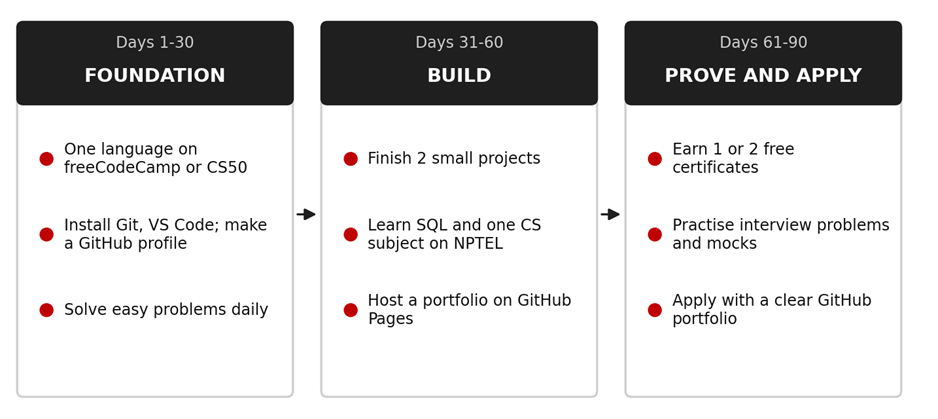
Days 1 to 30: Foundation
• Choose one language and one free path (freeCodeCamp or CS50 are good starts).
• Install Git and VS Code, create a GitHub profile and make your first repository.
• Study 60 to 90 minutes every day, and solve one easy problem daily.
Days 31 to 60: Build
• Finish two small projects and write a README for each.
• Learn SQL, and pick one core subject (such as data structures or DBMS) on NPTEL.
• Publish a simple portfolio page on GitHub Pages.
Days 61 to 90: Prove and apply
• Earn one or two free certificates that match your projects.
• Practise interview problems and do mock interviews with friends.
• Apply for jobs, internships and apprenticeships, and ask seniors for referrals.
Free Resource Traps to Avoid
• Hoarding. Saving fifty links and starting none of them. Choose one resource per stage.
• Tutorial hell. Watching videos without building anything. For every hour of watching, spend an hour coding.
• Hidden costs. A course advertised as free that asks for payment at the certificate step. Read the certificate terms first.
• Pirated courses. Downloaded paid courses are illegal and often carry malware. Free legal options are plentiful.
• Fake "free" offers. Be careful with messages that promise guaranteed jobs, or ask for a fee for registration or placement. Verify before you share documents or money.
• Sharing too much data. Use only official websites, and avoid sites that ask for unnecessary personal details.
How to Show Your Free Learning to Recruiters
• GitHub: pin your two or three best projects, each with a clear README, screenshots and setup steps.
• LinkedIn: add certificates under the licenses and certifications section with the verification link, and share project posts honestly.
• Resume: list projects first, with tools used and what you built. Add certificates in a short section and use numbers only if they are true.
• Interview: be ready to explain one project in detail, including what went wrong and how you fixed it. That story is worth more than any certificate.
Where Structured Guidance Can Help
Free resources are excellent, but they have one weakness: nobody checks your work or tells you what to learn next. If you would like guided learning, a centre such as upGrad Learning Support Centre, Pune can be a useful next step to explore, especially if you want structured practice in areas such as full stack development, data science or AI/ML, along with project work, mentor guidance and interview preparation.
You do not need to pay to start. Use the free plan above first, then decide whether you need more structure. Course content, fees, schedules and eligibility can change, so confirm the latest details directly with the centre.
Before joining any programme, ask whether you will build real projects and get feedback on them, whether mock interviews are included, and whether the curriculum matches what employers ask for today. Be cautious about anyone who guarantees a job, interviews or a salary, because nobody can honestly promise that.
Get Regular Job Updates
Looking for regular IT job updates, fresher opportunities, and career-related updates? Join our WhatsApp group for more job updates and opportunities.
Join our WhatsApp Group:
https://chat.whatsapp.com/KA8HpgjbJ67I5yfQDquCvn
Frequently Asked Questions (FAQs)
Q. Can I really get certified without paying anything?
Yes, in some cases. freeCodeCamp, the CS50 certificate, Kaggle Learn and several other platforms offer free certificates. However, many well-known certifications, such as NPTEL exams and cloud provider exams, charge a fee. Always read the certificate terms before you start.
Q. Is NPTEL really free?
The courses are free to enrol in and learn from. The certification exam is optional and paid. The official site lists Rs 1000 per course exam, but fees can differ, so check the current fee.
Q. Are free certificates valued by employers?
They are valued as supporting evidence, especially when backed by projects. Employers care more about what you can build and explain than about the certificate itself.
Q. Which free resource should a complete beginner start with?
freeCodeCamp is a good, structured start for web development, and CS50 is excellent for strong fundamentals. Pick one and finish it before starting another.
Q. How do I get the GitHub Student Developer Pack?
Apply through GitHub Education with a verified college email or other dated proof of enrolment. You must be a student aged 13 or older in a degree or diploma-granting programme, and verification lasts two years before renewal.
Q. Do I need a laptop to use these resources?
A basic computer helps. Many tools run in the browser, such as Google Colab and several coding platforms, so even a modest machine works. Use your college lab if you do not own one.
Q. How many hours a day should I study?
Consistency matters more than long hours. Around one to two focused hours a day, with weekend project time, is a realistic habit for most students.
Q. Should I buy a paid course at all?
Not at the start. Use free resources for 60 to 90 days. If you then feel you need structure, mentoring or interview practice, compare paid options carefully and check what they actually deliver.
Conclusion
You do not need money to start a serious IT career. You need a few good resources, a steady routine and the discipline to build things. Free platforms can take you from your first line of code to a portfolio that recruiters can open and read. Some certificates are free, some are not, and none of them replace real projects.
Your next step is simple. Pick one learning resource from Part 1, create your GitHub profile today, and follow the first 30 days of the plan. If you later want mentor feedback and structured practice, you can explore what upGrad Learning Support Centre, Pune offers for your chosen path.
And if you want regular job and fresher opportunity updates, use the WhatsApp group link in the "Get Regular Job Updates" section above.