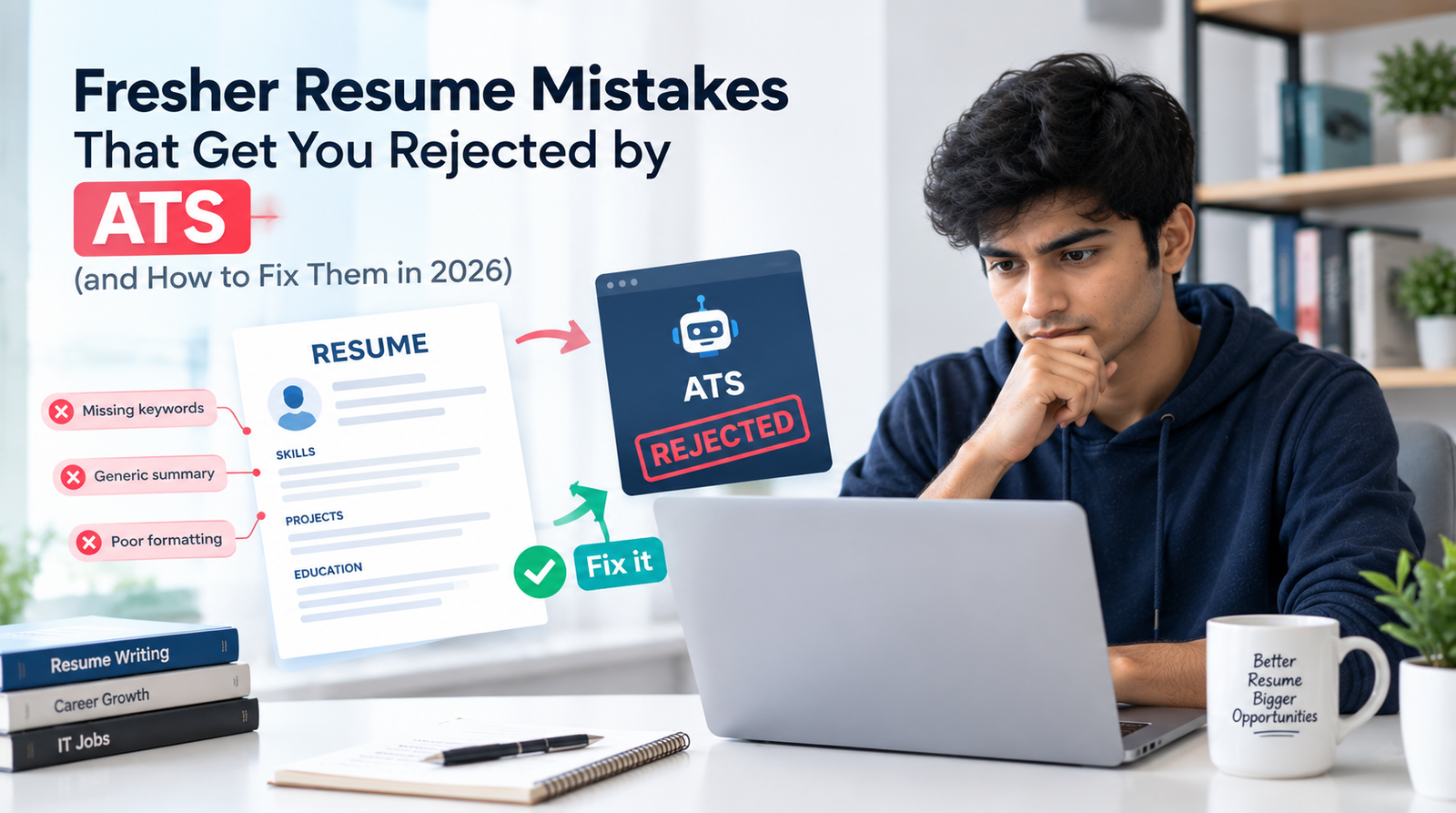
You spend a weekend choosing a template, adding icons, colours and skill bars. The resume looks modern and professional on your screen. Then you apply to thirty jobs and hear nothing. The design may be part of the problem, because a resume that looks perfect to you can reach the recruiter with your phone number missing, your skills scrambled or your whole page unreadable.
This guide explains the most common fresher ATS resume mistakes and gives you a clear fix for each. ATS stands for applicant tracking system, the software many employers use to collect, store and search applications. You do not need to fight it or trick it. You need to make your resume easy for software to read and easy for a human to trust.
Along the way you will get a five-minute test you can run on your own resume, a complete sample fresher resume in a safe layout, and a checklist to use before every application.
What This Guide Covers
• What an ATS actually does, and what it does not do
• The 10 mistakes freshers make, each with a clear fix
• A five-minute plain-text test to check your own resume
• How to write a strong summary and project bullets
• What to leave out of a fresher resume, and what to do with no experience
• A complete sample ATS-friendly fresher resume
• How to use keywords from a job description honestly
• Myths, a checklist, FAQs and the next step
What an ATS Actually Does
An ATS reads your file, pulls out information such as your name, contact details, education, skills and experience, and stores it as a profile. Recruiters then search and filter those profiles using keywords, job titles and screening questions. Some systems also rank or score candidates, and some employers add knock-out questions about eligibility.
This leads to an important point: the usual danger is not that a robot deletes your resume. The danger is that your information is read wrongly, partly or not at all, so you never appear in a recruiter's search or your profile looks incomplete.
|
What credible sources say Formatting risk: Career centres at Santa Clara University, the University of Illinois Chicago (UIC) and Columbia advise simple, single-column formats and caution against tables, text boxes, and putting key details in headers or footers, because some systems skip or scramble them. Dates: Santa Clara's guidance notes that systems may use dates to calculate how long you worked somewhere, so inconsistent date formats can cause errors. Auto-rejection: In a survey of 25 US recruiters by the resume company Enhancv, 92% said their ATS does not automatically reject resumes because of formatting, design or content. The sample is small and US-based, so treat it as an indicator only. Sources: scu.edu career centre, UIC Career Services and Enhancv (links under Further Reading). |
Put together, the message is balanced. Do not panic about a hidden "robot rejection", but do remove the formatting that can make your information unreadable, and remember that a human still decides who gets an interview.
The 10 ATS Mistakes Freshers Make (and the Fixes)
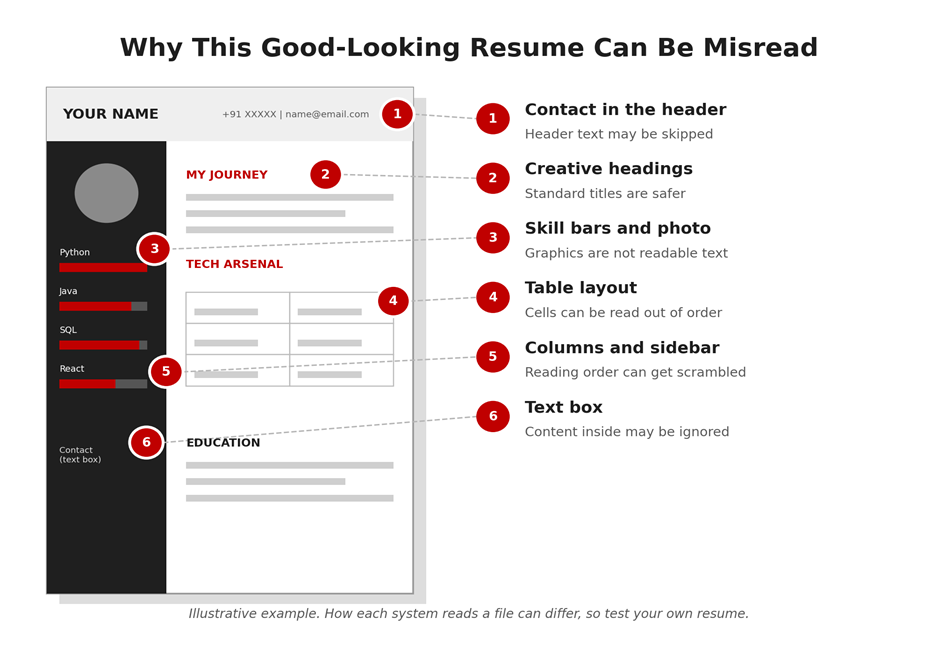
Mistake 1: Using a Two-Column, Sidebar or Table-Based Template
Free templates love columns and sidebars. The trouble is that software reads text in a straight line. With columns or tables, it may read across rows instead of down each column, mixing your skills with your education or your dates with the wrong job.
The fix:
• Use a single-column layout with sections stacked top to bottom.
• Write skills as a simple line of text, for example "Languages: Java, Python, SQL", instead of placing them in a sidebar or table.
• To align dates to the right, use a tab stop or write them after the title, instead of building a table.
• In Word, use Layout, then Columns, then One. Menu names can vary slightly by version.
Mistake 2: Putting Contact Details in the Header, Footer or a Text Box
A neat header with your phone number and email looks tidy, but several university career guides warn that systems may not read headers and footers consistently. If your contact details sit there, a recruiter may find a profile with no way to reach you.
The fix:
• Type your name, phone number, email, LinkedIn and GitHub links as the first lines in the main body of the document.
• Keep your name in plain text, not inside a logo, image or text box.
• Use a professional email ID based on your name.
Mistake 3: Using Images, Icons, Skill Bars and Photos as Content
A skill bar showing "Python: four out of five" tells software nothing. Icons, logos and photos are images, not text. And if your whole resume was exported as a picture, or you scanned a printed copy, there may be no readable text at all.
The fix:
• Write every skill as text. If you want to show level, use words such as "Proficient" or "Familiar", but only where honest.
• Keep important information out of images, including the photo area.
• Check your PDF: open it and try to highlight individual words with your cursor. If you can, it is text-based. If you can only select a block, it is an image.
• Export from Word or Google Docs as a PDF instead of scanning or taking a screenshot.
Mistake 4: Creative Section Headings
Headings like "My Journey", "Tech Arsenal" or "Playground" are fun to read, but systems and recruiters scan for familiar labels. Non-standard titles can make it harder to recognise which part of your resume is your education and which is your experience.
The fix: use standard headings.
• Summary (or Objective)
• Skills
• Projects
• Internship or Experience
• Education
• Certifications
Mistake 5: Not Matching the Wording of the Job Description
Recruiters search with keywords. If the job post says "REST APIs" and your resume says "web services", or the post says "Spring Boot" and you wrote only "Java frameworks", you may not appear in their search, even though you have the skill.
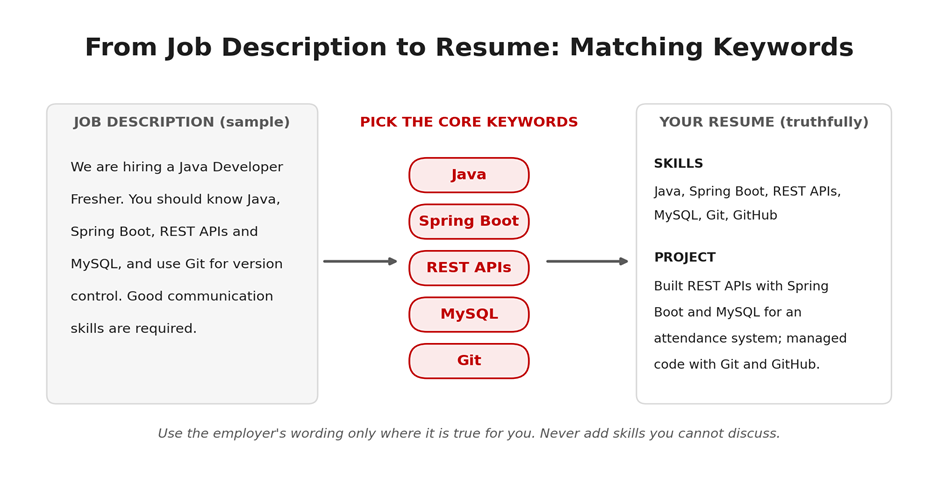
Here is a worked example. Suppose the job description reads:
|
Sample job description (fictional) "We are hiring a Java Developer Fresher. You should know Java, Spring Boot, REST APIs and MySQL, and use Git for version control. Good communication skills are required." |
The core keywords are Java, Spring Boot, REST APIs, MySQL and Git. If you really have those skills, your resume should show them in two places: in your Skills section, and inside a project bullet that proves them.
The fix:
• Read the job description and highlight the five to eight core skills.
• Use the employer's wording where it is true for you.
• Write the full form and the abbreviation once, for example "Structured Query Language (SQL)" or "Amazon Web Services (AWS)", because people search both ways.
• Keep a master resume and make a quick tailored copy for each role.
• Never add a skill you cannot discuss, and never hide keywords in white text. Recruiters and modern systems can spot this, and it destroys trust.
Mistake 6: A Long Keyword Dump With No Proof
Some freshers list thirty tools, hoping to match every job. A recruiter who sees "Python, Java, C++, React, Angular, AWS, Docker, Kubernetes, TensorFlow" with no projects behind them usually concludes that the candidate knows a little of everything and nothing well.
The fix:
• Group skills by type, such as Languages, Frameworks and Tools, and Concepts.
• List only skills you could discuss for five minutes in an interview.
• Make sure your top three skills appear again inside a project or internship bullet.
• Be honest about level. Familiar with Docker is better than a claim you cannot defend.
Mistake 7: Inconsistent Dates and Education Details
Mixed formats such as "2021-22", "Jun. 2020", "06/20" and "2020/06" in one resume make dates harder to read for people and software. Because some systems calculate how long you worked somewhere, unclear dates can also cause errors.
The fix:
• Pick one format and use it everywhere, such as "Jun 2025 to Aug 2025" or "06/2025 to 08/2025".
• For education, give the degree, institute, graduation year (or expected year) and marks in one consistent style, for example "CGPA: 8.1" or "78%".
• List items in reverse order, with the most recent first.
Mistake 8: Wrong File Type or a Careless File Name
A scanned image, a locked file or a document named "resume_final_final(2).pdf" creates problems before anyone reads a word. Some application forms specify a format, and ignoring it can cause your upload to fail or to be read incorrectly.
The fix:
• Follow the application's instructions first. If it says DOCX, send DOCX.
• If it does not specify, a text-based PDF or a DOCX file is generally the safest choice.
• Name the file clearly: Firstname_Lastname_Resume.pdf.
• Never upload a photo or scan of your resume.
Mistake 9: Fancy Bullets, Fonts and Special Characters
Arrows, emojis, decorative bullets and unusual fonts can turn into boxes or question marks when text is extracted. A resume then looks broken even though your original file looked fine.
The fix:
• Use standard bullets, a round dot or a simple dash.
• Choose a common font such as Arial, Calibri or Times New Roman at 10 to 12 points for body text.
• Avoid emojis, symbols and special characters, including in your skills and project titles.
Mistake 10: Passing the Software but Failing the Human
Even a perfectly parsed resume can be rejected if a recruiter reads vague lines, a three-page document or spelling errors. Remember that a person eventually reads your resume, and they decide quickly.
Compare these lines. The stronger versions give tools, actions and an outcome you can explain:
|
Weak Line |
Stronger Line |
|
Worked on a website project. |
Built a responsive online bookstore using HTML, CSS and JavaScript with search and cart features, and deployed it online. |
|
Knowledge of SQL. |
Designed a five-table student database in MySQL and wrote JOIN and GROUP BY queries to produce attendance reports. |
|
Did data analysis. |
Cleaned a public sales dataset with Python and pandas and built a Power BI dashboard showing monthly trends. |
The fix: keep it to one page, start each bullet with an action verb, add the tools you used, include only numbers that are true, and have a friend proofread it.
Writing a Summary That Works
A summary is the first thing a recruiter reads, and it is the best place to show your target role and your strongest keywords. Skip phrases like "hardworking" and "passionate team player", which every resume contains. Instead, use this formula in two lines:
Degree + target role + two or three core skills + one piece of proof.
|
Three examples (replace with your own truth) Java Developer: "Computer Engineering graduate seeking a Java Developer role. Built two projects using Java, Spring Boot and MySQL, with hands-on experience in REST APIs, Git and unit testing." Data Analyst: "B.Sc. Statistics graduate with working knowledge of SQL, Excel, Power BI and Python (pandas). Built a sales dashboard on a public dataset and seeking a Data Analyst fresher role." QA Engineer: "B.Tech IT graduate seeking a QA Engineer role. Experienced in writing test cases, logging defects and basic test automation through academic projects." |
Writing Project Bullets That Recruiters and Software Both Understand
Projects are the heart of a fresher resume. A strong bullet follows this pattern: action verb + what you built + tools used + a result you can explain. Use only numbers that are true, and be ready to explain every line in an interview.
• Web: "Built a task manager with React and Node.js featuring login and a PostgreSQL database; deployed it online and documented the API in the README."
• Data: "Analysed twelve months of sample sales data with Python and pandas and built a Power BI dashboard showing top products and monthly trends."
• Machine learning: "Trained a logistic regression model with scikit-learn to predict loan approval, compared three models and documented where it made errors."
• Cloud: "Hosted a static website on a cloud platform and set up automatic deployment from GitHub."
• QA: "Wrote 40 manual test cases for a sample e-commerce site and logged defects with steps to reproduce and severity."
• Linux and networking: "Set up a Linux virtual machine and documented the steps to host a simple web server."
Notice that each bullet names its tools. That is what makes the keywords appear naturally in context, instead of only in a list.
What to Leave Out of a Fresher Resume
Many freshers fill the page with details that add no value. A shorter, sharper resume reads better to both software and people. Unless an application specifically asks for something, you can usually leave these out:
• A photo. It is generally unnecessary for IT roles, and an image cannot be read as text.
• Personal details such as date of birth, father's name, religion or a full home address. Your city is enough.
• A long "declaration" paragraph or the line "references available on request".
• A long hobbies list. Keep one or two only if they are genuine and can start a conversation.
• School-level marks in detail, unless the application asks for them.
• Several phone numbers or email IDs. One of each is enough.
Some application forms and campus drives do ask for specific details. When they do, provide them exactly as requested.
If You Have No Experience or Very Few Projects
Having no work experience is normal for a fresher, and employers expect it. What matters is the proof you can show instead. Reorder your resume so the strongest evidence comes first:
1. Summary with your target role and top skills.
2. Skills, grouped by type and limited to what you can discuss.
3. Projects, with tools, your role and a link.
4. Training, internships or certifications, only if they are real and relevant.
5. Education, short and consistent.
If you have fewer than two projects, build one properly instead of listing many shallow ones. Take a familiar idea, add a feature of your own, put the code on GitHub with a clear README, and deploy it if you can. Academic and group projects count too, as long as you clearly state your own role.
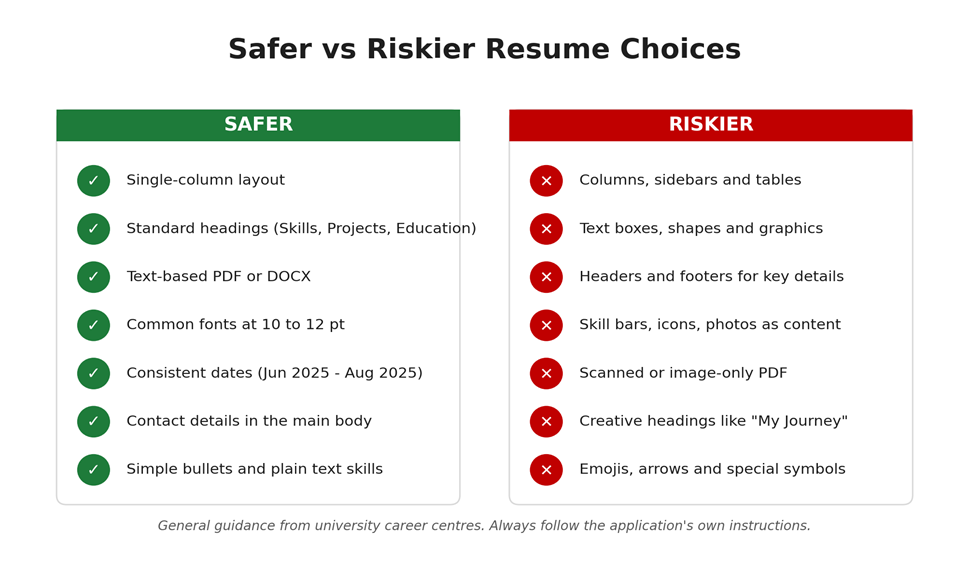
Quick Reference: Safer vs Riskier Choices
If you remember only one thing from the ten mistakes, remember this comparison.
Test Your Resume in Five Minutes
You can check how readable your resume is without any paid tool. This plain-text test is recommended by several career resources.
1. Open your resume as a PDF or DOCX.
2. Select all the text with Ctrl+A and copy it with Ctrl+C.
3. Paste it into Notepad or any plain-text editor.
4. Read it from top to bottom. Is your name first? Are your phone, email and links present and in order?
5. Check that skills, projects and education appear in the right sections, and that no text is jumbled or missing.
6. Check that dates and headings look clean and symbols have not turned into boxes.
7. Fix whatever looks broken, then test again.
Whatever looks wrong in the plain text is a warning sign. Many job portals and career pages also fill your profile automatically from the resume you upload. If those fields come out blank or wrong, treat it as a sign that your file did not read cleanly.
A Sample ATS-Friendly Fresher Resume
Below is a complete example in a safe, single-column layout. Replace every placeholder with your own real details, and do not copy projects or skills you have not done.
YOUR NAME
Pune, Maharashtra | +91-XXXXXXXXXX | yourname@email.com
LinkedIn: linkedin.com/in/yourname | GitHub: github.com/yourname
SUMMARY
Computer Engineering graduate seeking a Java Developer role. Skilled in Java, SQL
and REST APIs, with two projects built and deployed.
SKILLS
Languages: Java, Python, SQL, JavaScript
Frameworks and Tools: Spring Boot, React, MySQL, Git, GitHub, Postman
Concepts: Object-Oriented Programming, REST APIs, Data Structures, Unit Testing
PROJECTS
Student Attendance System | Java, Spring Boot, MySQL | github.com/yourname/attendance
- Built REST APIs for marking and viewing attendance for two user roles.
- Designed a five-table MySQL database and wrote JOIN queries for monthly reports.
- Fixed a login token-expiry bug and added unit tests for edge cases.
Online Bookstore | HTML, CSS, JavaScript, React | yourname.github.io/bookstore
- Developed a responsive storefront with search and cart features.
- Deployed the site online and documented the setup steps in the README.
INTERNSHIP OR TRAINING (only if real)
[Role], [Company], Jun 2025 to Aug 2025
- [One honest line about what you did, the tools used and the outcome.]
EDUCATION
B.E. Computer Engineering, [College], Pune | Expected 2026 | CGPA: [x.xx]
HSC or Diploma, [Board], 2022 | [xx]%
CERTIFICATIONS
[Certificate name], [Provider], 2025
Notice what this layout does right: contact details sit in the body, headings are standard, skills are grouped and written as text, every project names its tools and shows what you did, dates share one format, and everything fits on one page.
What to Emphasise for Different IT Roles
The same resume rarely works for every role. Keep the layout identical and change what you emphasise.
• Software or web developer: put your main language, frameworks, databases, Git and one deployed project at the top. Mention REST APIs, unit testing and version control if you have used them.
• Data analyst: emphasise SQL, Excel, a dashboard tool such as Power BI or Tableau, and Python with pandas. A published dashboard with written insights is strong proof.
• QA or test engineer: highlight test case design, defect reporting, test management basics and any automation tool you have used. Show a sample test suite or bug report if you can.
• Cloud or DevOps trainee: show Linux, one cloud platform, Git, and a simple deployment or pipeline you set up yourself.
• AI or ML trainee: show Python, the libraries you used, one prediction project and an honest note on what the model got wrong.
Myths Freshers Believe About ATS
• "The ATS deletes my resume if my score is low." Systems and settings vary. In the small recruiter survey cited above, most said they did not auto-reject on formatting or content. Eligibility questions and keyword search still matter, so focus on readability and relevance instead of chasing a perfect score.
• "I need a 100% score on an online ATS checker." These tools can help you spot problems, but their scores differ from tool to tool and do not tell you what a real employer's system or recruiter will do.
• "PDF is always bad and Word is always safe." A text-based PDF is generally fine. What matters is that the text is selectable and that you follow the application's instructions.
• "Hidden white keywords will beat the system." They can be spotted and they damage your credibility. Do not use them.
• "ATS-friendly means ugly." A clean single-column resume with clear headings and good spacing can look very professional.
Fixing Your Resume in Word or Google Docs
• Remove columns: in Word, Layout, then Columns, then One.
• Remove text boxes and shapes: select each one and move the text into normal paragraphs.
• Check headers and footers: double-click the top or bottom margin and move any key details into the body.
• Replace tables: copy the text out of each table into normal lines and use tab stops for alignment.
• Save as PDF: in Word, File, then Save As, then choose PDF. In Google Docs, File, Download, PDF. Then test by selecting text.
Menu names differ slightly between versions, so use the search box in your editor if you cannot find an option.
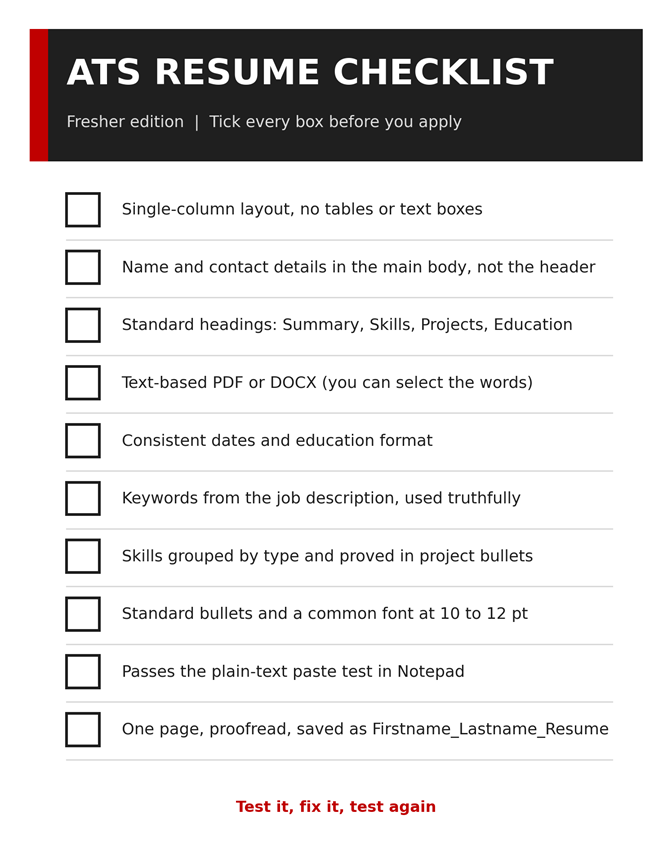
Your ATS Resume Checklist
Run through this before every application. Each tick is one less reason for your resume to be misread.
Where Structured Guidance Can Help
Fixing the format is the easy part. The harder part is deciding what to say: which projects to show, how to describe your work and how to prepare for interviews once your resume gets noticed. If you would like guided support, a learning centre such as upGrad Learning Support Centre, Pune can be a useful next step to explore.
Structured programmes in areas like data, AI/ML, full stack development and digital marketing generally combine a planned curriculum, hands-on projects, mentor guidance and interview preparation. Real projects and clear communication are exactly what make a resume stand out. Course content, fees, schedules and eligibility can change, so confirm the latest details directly with the centre.
Before joining any programme, ask whether you will build real projects and get feedback on them, whether resume reviews and mock interviews are included, and whether the curriculum matches what employers ask for today. Be cautious about anyone who guarantees a job, interviews or a salary, because nobody can honestly promise that.
Get Regular Job Updates
Looking for regular IT job updates, fresher opportunities, and career-related updates? Join our WhatsApp group for more job updates and opportunities.
Join our WhatsApp Group: https://chat.whatsapp.com/KA8HpgjbJ67I5yfQDquCvn
Frequently Asked Questions (FAQs)
Q. Do freshers really need an ATS-friendly resume?
Many employers use applicant tracking software to collect and search applications, so a clean, readable format helps your information reach the recruiter intact. It is not a trick. It is basic readability, and it also makes the resume easier for humans.
Q. Is PDF or Word better for ATS?
Either is usually fine if the text is selectable. Always follow the application's instructions first. If none are given, a text-based PDF or a DOCX file is generally the safest choice.
Q. Does an ATS automatically reject resumes?
It depends on how the employer has set it up. In one small recruiter survey, most said their system did not auto-reject on formatting, design or content, but eligibility questions and keyword searches can still filter candidates.
Q. Can an ATS read a two-column resume?
Sometimes, but columns and tables are a common cause of scrambled text. A single-column layout is a safer choice, especially when you do not know which system the employer uses.
Q. How many keywords should I use?
There is no magic number. Use the core skills from the job description that are true for you, and place them naturally in your Skills section and in project bullets. Do not stuff or hide keywords.
Q. Should I add a photo to my resume?
For most IT roles it is not necessary. If a form specifically asks for one, follow it, but keep all your text, including your name and contact details, outside the image.
Q. How long should a fresher resume be?
One page is the usual guidance for freshers. It forces you to keep only your strongest and most relevant information.
Q. How can I check if my resume is ATS-friendly?
Run the plain-text test: copy all the text from your resume, paste it into Notepad and check that the order, headings, contact details and dates are clean and complete. Also confirm that you can select words in your PDF.
Conclusion
Most fresher ATS resume mistakes come down to one idea: making a resume that looks good but reads badly. Columns, text boxes, header contact details, images and creative headings can all hide your information from the very people searching for it. The fixes are simple: a single column, standard headings, plain text, honest keywords and consistent dates.
Your next step takes five minutes. Run the plain-text test on your resume today, fix whatever looks broken and tick through the checklist. Then spend your remaining time on what actually wins interviews: real projects and clear, honest descriptions. If you want mentor feedback on your resume and projects, you can also explore what upGrad Learning Support Centre, Pune offers for your chosen path.
And if you want regular job and fresher opportunity updates, use the WhatsApp group link in the "Get Regular Job Updates" section above.