Your first coding interview rarely goes wrong because you do not know enough. It goes wrong in small, avoidable ways: you start typing too early, miss an empty array, compare two strings with the wrong operator, or finish without running a single test. The interviewer notices every one of those slips, and quietly adjusts their opinion with each.
The good news is that the first coding interview mistakes freshers make are remarkably consistent. This guide covers the ten most common ones. For each mistake you get what goes wrong, why it hurts, the exact Java fix as a complete program, the real output, the time complexity and the follow-up questions interviewers like to ask. Every fix was compiled and run, so the output shown is real.
How to use it: type each fix yourself instead of copying it. Run it, break it on purpose, and then explain it aloud as if you were in the interview room. That is exactly what a first interview asks of you.
The 10 Mistakes at a Glance
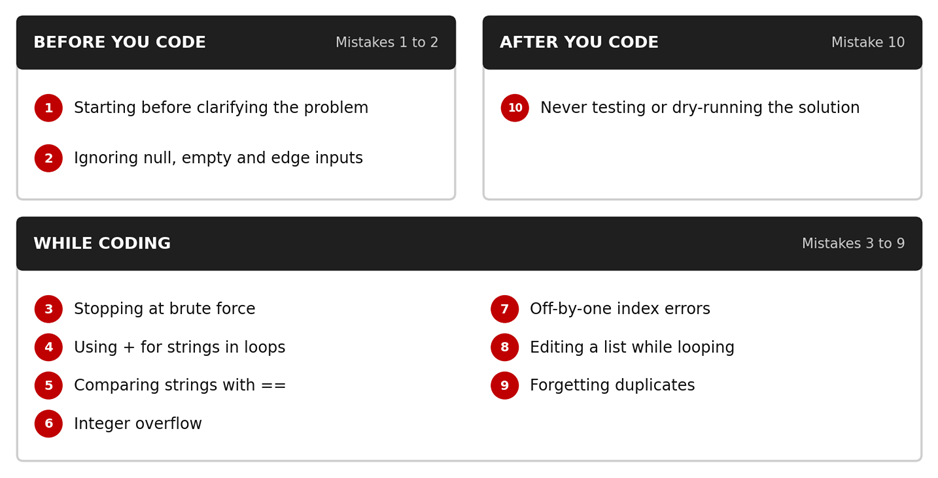
What This Guide Covers
• How to run the programs on your own computer
• A five-step method for answering any coding question
• 10 mistakes in three groups: before you code, while coding and after you code
• What to do when you freeze, with a simple four-step routine
• A quick revision table, a 7-day practice plan and common interview questions
How to Run These Programs
You need the JDK (Java Development Kit). Install a recent long-term-support version from an official source and check it by typing java -version in your terminal. The programs use List.of, so they need Java 9 or above. The outputs shown here were produced on Java 21.
Every fix is written as a class named Main. Save it as Main.java, then compile and run it:
javac Main.java
java Main
// On Java 11 and above, you can also run a single file directly:
java Main.java
How to Answer a Coding Question in an Interview
Most of the ten mistakes disappear if you follow one habit on every problem:
1. Clarify. Repeat the problem and ask about edge cases: negative numbers, zero, empty input, duplicates.
2. Work an example by hand. Take a small input and trace it on paper.
3. Explain your approach in two or three sentences before writing any code.
4. Write clean code with meaningful names, then trace your own example through it.
5. Test and state the complexity. Try edge cases and mention one possible improvement.
What a strong spoken answer sounds like (Mistake 1, Two Sum)
"Before I code, can I confirm whether you want indices or values, and whether there is always exactly one answer? Let me take {2, 7, 11, 15} with target 9. I will store each number I have seen in a HashMap. For every element I check whether target minus that element is already in the map. That finds the pair in one pass, so O(n) time and O(n) space. Let me also test a case with no valid pair."
Part 1: Before You Code (Mistakes 1 and 2)
Mistake 1: Starting to Code Before Clarifying the Problem
What happens: The interviewer says, "Find two numbers that add up to a target." You open the editor and start typing. Ten minutes later you learn they wanted indices, not values, and that the array was not sorted.
Why it hurts: Interviewers often leave details vague on purpose. Asking questions shows that you think like an engineer, because real requirements are never perfectly clear.
The fix: Ask three or four short questions first: indices or values? Exactly one answer? Can I reuse the same element? Can the array be empty? Then work one example by hand and only then write code.
import java.util.HashMap;
import java.util.Map;
public class Main {
static int[] twoSum(int[] nums, int target) {
Map<Integer, Integer> seen = new HashMap<>();
for (int i = 0; i < nums.length; i++) {
int need = target - nums[i];
if (seen.containsKey(need)) {
return new int[] { seen.get(need), i };
}
seen.put(nums[i], i);
}
return new int[] {};
}
public static void main(String[] args) {
int[] nums = {2, 7, 11, 15};
int[] result = twoSum(nums, 9);
System.out.println("Indices: " + result[0] + ", " + result[1]);
int[] none = twoSum(nums, 100);
System.out.println(none.length == 0 ? "No pair found" : "Pair found");
}
}
Output:
Indices: 0, 1
No pair found
Complexity: O(n) time and O(n) space, compared with O(n squared) for two nested loops.
Interviewers may ask: What if the array is sorted? (Use two pointers with O(1) space.) What if there are several valid pairs? What if the same number appears twice, such as {3, 3} with target 6? (The map approach still works because it checks before storing.)
Mistake 2: Ignoring Null, Empty and Unusual Inputs
What happens: Your code works for the sample input and crashes, or silently returns a wrong answer, on anything unusual.
Why it hurts: Edge cases are where real bugs live, and interviewers test them deliberately in follow-up questions.
Common version (wrong for all-negative arrays):
int max = 0;
for (int n : arr) {
if (n > max) max = n;
}
return max; // returns 0 for {-5, -2, -9}, which is not even in the array
The fix: validate the input and start from the first element.
public class Main {
static int findMax(int[] arr) {
if (arr == null || arr.length == 0) {
throw new IllegalArgumentException("Array must not be null or empty");
}
int max = arr[0];
for (int i = 1; i < arr.length; i++) {
if (arr[i] > max) max = arr[i];
}
return max;
}
public static void main(String[] args) {
System.out.println(findMax(new int[] {3, 9, 2}));
System.out.println(findMax(new int[] {-5, -2, -9}));
try {
findMax(new int[] {});
} catch (IllegalArgumentException e) {
System.out.println("Caught: " + e.getMessage());
}
}
}
Output:
9
-2
Caught: Array must not be null or empty
Complexity: O(n) time and O(1) space.
Interviewers may ask: Should the method throw an exception or return a default value? (There is no single right answer; state your choice and why.) What would you return for an array of one element?
Part 2: While Coding (Mistakes 3 to 9)
Mistake 3: Stopping at the Brute-Force Solution
What happens: You write nested loops, get the right answer and relax. The interviewer asks, "Can you do better?" and you freeze.
Why it hurts: A working brute force is a good start. Interviewers want to see whether you can spot inefficiency and improve it.
Common version: O(n squared)
for (int i = 0; i < arr.length; i++) {
for (int j = i + 1; j < arr.length; j++) {
if (arr[i] == arr[j]) return true;
}
}
return false;
The fix: trade a little memory for speed with a HashSet.
import java.util.HashSet;
import java.util.Set;
public class Main {
static boolean hasDuplicate(int[] arr) {
Set<Integer> seen = new HashSet<>();
for (int n : arr) {
if (!seen.add(n)) return true; // add() returns false if already present
}
return false;
}
public static void main(String[] args) {
System.out.println(hasDuplicate(new int[] {4, 2, 7, 2, 9}));
System.out.println(hasDuplicate(new int[] {4, 2, 7, 1, 9}));
System.out.println(hasDuplicate(new int[] {}));
}
}
Output:
true
false
false
Complexity: O(n) time on average and O(n) space, compared with O(n squared) time and O(1) space for the brute force.
Interviewers may ask: What if memory is limited? (Sort first, then compare neighbours in O(n log n).) Why does HashSet.add() return a boolean?
Mistake 4: Building Strings with + Inside a Loop
What happens: You reverse a string by adding one character at a time with +=.
Why it hurts: Strings in Java are immutable. Every += creates a new String and copies the old characters, which can add up to O(n squared) work for long inputs.
Common version:
String result = "";
for (int i = s.length() - 1; i >= 0; i--) {
result += s.charAt(i); // creates a new String every time
}
The fix: use StringBuilder.
public class Main {
static String reverse(String s) {
StringBuilder sb = new StringBuilder();
for (int i = s.length() - 1; i >= 0; i--) {
sb.append(s.charAt(i));
}
return sb.toString();
}
public static void main(String[] args) {
System.out.println(reverse("interview"));
System.out.println("[" + reverse("") + "]");
System.out.println(new StringBuilder("interview").reverse()); // built-in option
}
}
Output:
weivretni
[]
weivretni
Complexity: O(n) time and O(n) space.
Interviewers may ask: What is the difference between String, StringBuilder and StringBuffer? (String is immutable; StringBuilder is mutable and not synchronized; StringBuffer is mutable and synchronized.) Can you reverse without the built-in method?
Mistake 5: Comparing Strings with ==
What happens: Your comparison works in a quick test, then fails in another case. This is one of the most common Java bugs among beginners.
Why it hurts: For objects, == checks whether two references point to the same object. It does not compare content. String literals can share one object, which hides the bug until you meet a string created at runtime.
The fix: Use equals for content, and put the known value first to avoid a NullPointerException.
public class Main {
public static void main(String[] args) {
String a = "java";
String b = new String("java");
System.out.println("a == b : " + (a == b));
System.out.println("a.equals(b) : " + a.equals(b));
System.out.println("\"java\".equals(null): " + "java".equals(null));
System.out.println("equalsIgnoreCase: " + "JAVA".equalsIgnoreCase(a));
}
}
Output:
a == b : false
a.equals(b) : true
"java".equals(null): false
equalsIgnoreCase: true
Complexity: Comparing two strings takes O(length) time.
Interviewers may ask: What is the String pool? What does intern() do? Why does "java" == "java" often print true?
Mistake 6: Forgetting Integer Overflow
What happens: Sums, products or midpoints silently wrap around to negative values when they pass the limit of an int, which is 2,147,483,647. A classic example is the midpoint in binary search.
Why it hurts: The bug produces wrong answers without any error message, which makes it hard to find under pressure.
The fix: Calculate the midpoint as low + (high - low) / 2, and use long when sums can be large.
public class Main {
public static void main(String[] args) {
int a = Integer.MAX_VALUE;
int wrong = a + 1;
long right = (long) a + 1;
System.out.println("int result : " + wrong);
System.out.println("long result: " + right);
int low = 2_000_000_000, high = 2_100_000_000;
int badMid = (low + high) / 2;
int goodMid = low + (high - low) / 2;
System.out.println("bad mid : " + badMid);
System.out.println("good mid : " + goodMid);
}
}
Output:
int result : -2147483648
long result: 2147483648
bad mid : -97483648
good mid : 2050000000
Complexity: O(1). The cost of this bug is correctness, not speed.
Interviewers may ask: What happens when a long is cast to an int? How does Math.addExact help? (It throws an exception on overflow instead of wrapping.)
Mistake 7: Off-by-One and Array Index Errors
What happens: Your loop runs one step too far or stops one step early, and the program throws an ArrayIndexOutOfBoundsException or skips the last element.
Why it hurts: It looks careless, and it is easy to avoid if you test the first and last positions deliberately. Valid indexes run from 0 to length minus 1.
The fix: Write the loop bounds carefully, then test with a tiny example. The program below reverses an array in place with two pointers and also shows the classic <= bug being caught.
import java.util.Arrays;
public class Main {
static void reverseInPlace(int[] arr) {
int left = 0, right = arr.length - 1;
while (left < right) {
int temp = arr[left];
arr[left] = arr[right];
arr[right] = temp;
left++;
right--;
}
}
public static void main(String[] args) {
int[] arr = {1, 2, 3, 4, 5};
reverseInPlace(arr);
System.out.println(Arrays.toString(arr));
try {
for (int i = 0; i <= arr.length; i++) { // the bug: <= instead of <
int x = arr[i];
}
} catch (ArrayIndexOutOfBoundsException e) {
System.out.println("Caught ArrayIndexOutOfBoundsException");
}
}
}
Output:
[5, 4, 3, 2, 1]
Caught ArrayIndexOutOfBoundsException
Complexity: O(n) time and O(1) space.
Interviewers may ask: Why does the loop condition use left < right and not left <= right? What happens with an even and an odd number of elements?
Mistake 8: Removing Items from a List While Looping Over It
What happens: You try to remove even numbers inside a for-each loop, and the program usually throws a ConcurrentModificationException.
Why it hurts: It shows you do not know how Java collections behave during iteration, a common follow-up topic.
The fix: Use removeIf, or an Iterator with its own remove() method.
import java.util.ArrayList;
import java.util.ConcurrentModificationException;
import java.util.List;
public class Main {
public static void main(String[] args) {
List<Integer> list = new ArrayList<>(List.of(1, 2, 3, 4, 5, 6));
list.removeIf(n -> n % 2 == 0);
System.out.println(list);
List<Integer> broken = new ArrayList<>(List.of(1, 2, 3, 4, 5, 6));
try {
for (Integer n : broken) {
if (n % 2 == 0) broken.remove(n); // the bug
}
} catch (ConcurrentModificationException e) {
System.out.println("Caught ConcurrentModificationException");
}
}
}
Output:
[1, 3, 5]
Caught ConcurrentModificationException
Complexity: removeIf runs in O(n) time on an ArrayList.
Interviewers may ask: What is a fail-fast iterator? How would you do the same with an Iterator? Why does List.of() return a list you cannot modify?
Mistake 9: Forgetting About Duplicates
What happens: You find the second largest element by sorting and taking the second element from the end. It works for {3, 8, 5} and fails for {10, 10, 5}, where the answer should be 5.
Why it hurts: It shows you tested only the happy path. Duplicates and equal values are among the first things an interviewer tries.
The fix: Use a single pass that tracks the largest and second largest distinct values. The last line of output shows the wrong answer the sort-based version gives.
import java.util.Arrays;
public class Main {
static int secondLargest(int[] arr) {
if (arr == null || arr.length < 2) {
throw new IllegalArgumentException("Need at least two elements");
}
Integer first = null, second = null;
for (int n : arr) {
if (first == null || n > first) {
second = first;
first = n;
} else if (n != first && (second == null || n > second)) {
second = n;
}
}
if (second == null) {
throw new IllegalStateException("No second largest value");
}
return second;
}
public static void main(String[] args) {
System.out.println(secondLargest(new int[] {12, 35, 1, 10, 34, 35}));
System.out.println(secondLargest(new int[] {10, 10, 5}));
int[] sorted = {10, 10, 5};
Arrays.sort(sorted);
System.out.println("Sort-based answer (wrong): " + sorted[sorted.length - 2]);
}
}
Output:
34
5
Sort-based answer (wrong): 10
Complexity: O(n) time and O(1) space, compared with O(n log n) for sorting.
Interviewers may ask: How would you find the k-th largest element? What should the method return when all elements are equal?
Part 3: After You Code (Mistake 10)
Mistake 10: Never Testing or Dry-Running Your Code
What happens: You write the last line, say "I am done" and wait. The interviewer then finds a bug in thirty seconds.
Why it hurts: Testing your own work is a core engineering habit. Skipping it suggests you may ship bugs.
The fix: Trace the code by hand with a small example, then run deliberate test cases: a normal case, an empty input, a single element and a null. A tiny check method makes this quick, even without a testing library.
public class Main {
static boolean isPalindrome(String s) {
if (s == null) return false;
int left = 0, right = s.length() - 1;
while (left < right) {
if (s.charAt(left) != s.charAt(right)) return false;
left++;
right--;
}
return true;
}
static void check(String input, boolean expected) {
boolean actual = isPalindrome(input);
System.out.println((actual == expected ? "PASS" : "FAIL") + " -> \"" + input + "\"");
}
public static void main(String[] args) {
check("madam", true);
check("hello", false);
check("", true);
check("a", true);
check(null, false);
}
}
Output:
PASS -> "madam"
PASS -> "hello"
PASS -> ""
PASS -> "a"
PASS -> "null"
Complexity: Each check costs the same as the method under test, here O(n).
Interviewers may ask: Should isPalindrome(null) return false or throw an exception? (Confirm this with the interviewer.) How would you ignore case and spaces?
The Mistake Behind the Mistakes: Freezing and Going Silent
Many freshers can fix every bug above and still lose the interview because they stop talking when they get stuck. Silence makes it impossible for the interviewer to help you or to give credit for your thinking. Getting stuck is normal. What matters is how you handle it.
What to Do When You Get Stuck
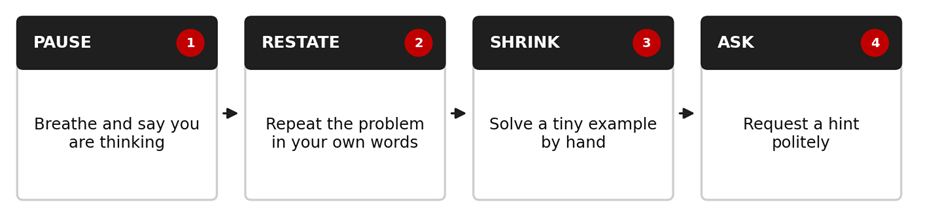
A useful sentence to memorise: "Here is what I know so far, and here is where I am stuck. Could I get a small hint on the next step?" Interviewers often respect this more than a long silence or a random guess.
The 10 Fixes at a Glance
|
# |
Mistake |
Quick fix |
|
1 |
Coding before clarifying |
Ask 3 or 4 questions and trace one example first |
|
2 |
Ignoring edge cases |
Validate null and empty input; start from arr[0] |
|
3 |
Stopping at brute force |
State the complexity, then optimise with HashSet or HashMap |
|
4 |
Using + in string loops |
Use StringBuilder |
|
5 |
Using == for strings |
Use equals or equalsIgnoreCase |
|
6 |
Integer overflow |
Use low + (high - low) / 2 and long for large sums |
|
7 |
Off-by-one errors |
Valid indexes are 0 to length - 1; test first and last |
|
8 |
Editing a list in a loop |
Use removeIf or Iterator.remove() |
|
9 |
Forgetting duplicates |
Track distinct values in a single pass |
|
10 |
Not testing |
Trace by hand and run edge-case checks |
A 7-Day Plan to Fix These Habits
• Day 1: Mistakes 1 and 2. Type both programs, then ask three clarifying questions aloud before each one.
• Day 2: Mistakes 3 and 4. Write the brute-force version first, then improve it, and say the complexity of each.
• Day 3: Mistakes 5 and 6. Break each program on purpose and watch the wrong output appear.
• Day 4: Mistakes 7 and 8. Trace the loops on paper with a three-element example.
• Day 5: Mistakes 9 and 10. Add three of your own edge-case checks to every program you write.
• Day 6: Solve five earlier practice problems from scratch using the five-step habit, speaking aloud.
• Day 7: Do a mock interview with a friend: three problems, 20 minutes each. Note which mistakes still appear.
How to Show This Practice on Your Resume
Listing "Java" in a skills line proves little. Showing practice proves more. Create a GitHub repository named something like coding-interview-practice, add each fix as a separate Main.java file, and include a README with the problem, the approach, the complexity and the sample output. Then mention it honestly on your resume. Use a number only if it is true.
Where Structured Guidance Can Help
Practising alone works, but it is hard to judge your own explanations or to know whether your code is truly interview-ready. If you would like guided learning, a centre such as upGrad Learning Support Centre, Pune can be a useful next step to explore, especially if you want structured practice, project work and mock interview feedback.
Structured programmes in areas like full stack development, data and AI/ML generally combine a planned curriculum, hands-on projects, mentor guidance and interview preparation. Course content, fees, schedules and eligibility can change, so confirm the latest details directly with the centre.
Before joining any programme, ask whether you will build real projects and get feedback on them, whether mock interviews are included, and whether the curriculum matches what employers ask for today. Be cautious about anyone who guarantees a job, interviews or a salary, because nobody can honestly promise that.
Get Regular Job Updates
Looking for regular IT job updates, fresher opportunities, and career-related updates? Join our WhatsApp group for more job updates and opportunities.
Join our WhatsApp Group:
https://chat.whatsapp.com/KA8HpgjbJ67I5yfQDquCvn
Frequently Asked Questions (FAQs)
Q. What are the most common mistakes in a first coding interview?
Coding before clarifying the problem, ignoring edge cases, stopping at brute force, misusing string comparison, overlooking overflow, off-by-one errors, modifying lists while iterating, forgetting duplicates and not testing the solution.
Q. How do I stop making silly mistakes in coding interviews?
Follow a fixed routine on every problem: clarify, work an example, explain the approach, code, then test. Practise it until it becomes a habit under pressure.
Q. Should I write code or explain my approach first?
Explain your approach first, briefly, including complexity. Then code. The interviewer can correct your direction early, which saves time and shows clear thinking.
Q. What should I do if I get stuck during a coding interview?
Pause, restate the problem, try a tiny example by hand and politely ask for a hint. Keep talking through your thinking so the interviewer can follow it.
Q. Is it okay to start with a brute-force solution?
Yes, if you say it is a starting point and then discuss how to improve it. Naming the complexity and suggesting an optimisation shows good judgement.
Q. Why is == wrong for comparing strings in Java?
For objects, == compares references, not content. Use equals, or equalsIgnoreCase, to compare the characters of two strings.
Q. How many edge cases should I test in an interview?
There is no fixed number. Cover the main ones: empty or null input, a single element, duplicates, negative numbers and the largest or smallest values that make sense for the problem.
Q. Do I need to memorise code for coding interviews?
No. Understand the logic so you can adapt it to follow-up questions. Memorised code usually fails when the interviewer changes the problem slightly.
Conclusion
Your first coding interview is not a test of genius. It is a test of habits: asking before assuming, handling edge cases, choosing sensible data structures, writing safe Java and checking your own work. Each of the ten mistakes above is a habit you can replace within a few weeks of focused practice.
Your next step is simple. Set up Java today, type the programs for Mistakes 1 and 2, run them, and start the 7-day plan. If you want mentor feedback and structured interview practice, you can also explore what upGrad Learning Support Centre, Pune offers for your chosen path.
And if you want regular job and fresher opportunity updates, use the WhatsApp group link in the "Get Regular Job Updates" section above